
Running the Virtual Ecosystem in Static Mode#
Why use Static Mode?#
Imagine standing in a rainforest clearing at dawn. The sun rises, mist lifts, and the forest slowly comes to life.
Now imagine you could pause parts of this scene — hold the soil moisture constant, freeze the behaviour of animals, or keep the microclimate unchanged — while the rest of the ecosystem continues to move through time.
This is the essence of the Static Mode in the Virtual Ecosystem model.
In complex systems where everything interacts it can be hard to isolate what’s causing what. Static Mode helps untangle this web by letting you “freeze” components like plants or animals while others remain dynamic. At each model step, static components reset to their original state (e.g. eaten leaves magically reappear) — like a controlled reset — so any change comes only from the active, evolving parts.
This setup enables targeted experiments within the full model framework. For example, you can test how vegetation responds to changing temperatures without feedback from soil moisture changes, or explore animal behaviour in a fixed vegetation landscape.
By choosing which components evolve over time and which stay fixed, Static Mode helps reveal drivers of ecological change - helping us understand not just what happens, but why.
Note
The Virtual Ecosystem model can, in theory, be run with any combination of one or more
components held static (except core). However, not all combinations are equally
meaningful. It’s worth
considering your experimental goals carefully and selecting static–dynamic
configurations that best support the processes you want to isolate or understand.
Using the static mode#
This example demonstrates how to configure and run the Virtual Ecosystem with selected components held static (for more technical details, see). Specifically, we focus on hydrology by keeping the microclimate, vegetation, animals, litter, and soils fixed. This isolates hydrological processes and so we can examine how individual model parameters and process representations influence model behaviour.
We run two experiments:
HydroDefault: ‘hydrology-only’ simulation with default configuration
HydroDry: ‘hydrology-only’ simulation with reduced initial soil moisture
In practice this means:
Microclimate is fixed: e.g., temperature and relative humidity stay constant
Plants are static: e.g. water uptake, transpiration, and interception do not vary
Soil microbes, litter, and animals do not feedback into hydrology
Only hydrology processes evolve over time in response to precipitation
Finally, we compare their outputs to the default setup (ve_example) where all
components run dynamically.
Note
This guide focuses on how to technically configure and run static mode, not on interpreting the experimental results. This enables you to adapt the setup to suit your own analysis goals.
The code below to run the Virtual Ecosystem and plot results uses a mixture of the
command line (e.g. bash on Linux or MacOS, powershell on Windows) and python code.
For the code run at the command line, we currently only show the syntax for using
bash. On Windows, you will need to change the paths (for example, to
C:\Users\username\Temp\...).
1: Run ve_example as a baseline#
Before setting up static experiments, make sure you can run the model successfully. If you haven’t yet installed and executed the example, follow the example instructions to familiarise yourself with the setup.
Install the example code - do make sure that you don’t have an old copy of this example code in your temporary directory before starting this exercise!
%%bash
# Install the example data directory from the Virtual Ecosystem package
ve_run --install-example /tmp/
Run the example model with the provided full configuration.
%%script bash --err discarded_stderr
# Run the example
ve_run /tmp/ve_example/config/data_config.toml \
  /tmp/ve_example/config/abiotic_simple_config.toml \
  /tmp/ve_example/config/animal_config.toml \
  /tmp/ve_example/config/hydrology_config.toml \
  /tmp/ve_example/config/litter_config.toml \
  /tmp/ve_example/config/plant_config.toml \
  /tmp/ve_example/config/soil_config.toml \
  --outpath /tmp/ve_example/out/ \
  --logfile /tmp/ve_example/out/ve_example.log
2: HydroDefault experiment#
Configure static components#
Once the baseline run is complete, you can set up the experiment with default ‘hydrology-only’ (no changes to parameters or input data):
This is essential: Create a new output folder:
/ve_example/HydroDefault_out/. The Virtual Ecosystem output files have fixed names and cannot be overwritten; if they already exist in your output directory, the model will crash.Navigate to the
/ve_example/out/folder.Copy the
compiled_configuration.tomlfile and rename it, for example toHydroDefault_config.toml.In the new file, set
static = truefor all components except hydrology and core, e.g.:[abiotic_simple] static=true
Run HydroDefault experiment#
Now run the model with the new configuration from your command line and make sure that
the --outpath command in the second line is followed by the directory of the new
output folder that you just created (here /tmp/ve_example/HydroDefault_out/),
and the --logfile command in the third line is followed by the same path and a new
file name ending in .log:
%%script bash --err discarded_stderr
ve_run /tmp/ve_example/static_config/HydroDefault_config.toml \
  --outpath /tmp/ve_example/HydroDefault_out/ \
  --logfile /tmp/ve_example/HydroDefault_out/HydroDefault.log
Compare HydroConst results to baseline#
To compare the results of the HydroDefault experiment to the fully dynamic ve_example,
load the continuous results from /ve_example/out/ and /ve_example/HydroDefault_out/:
import matplotlib.cm as cm
import matplotlib.pyplot as plt
import numpy as np
import xarray

# Example: load or define your datasets
ve_example = xarray.load_dataset("/tmp/ve_example/out/model_data.zarr", group="outputs")
hydrodefault = xarray.load_dataset(
    "/tmp/ve_example/HydroDefault_out/model_data.zarr", group="outputs"
)
Air temperature above the canopy#
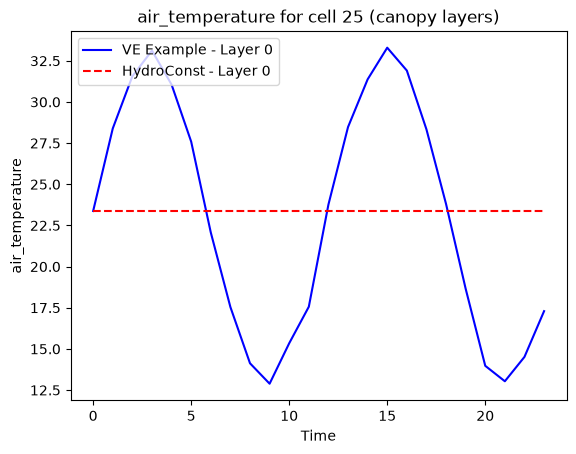
The air temperature above the canopy is provided by an external data source at each time step. In the dynamic abiotic mode, this input is a time series to the Virtual Ecosystem that changes over time, allowing the model to respond to seasonal variation in atmospheric conditions. In static abiotic mode, by contrast, the same temperature value is used repeatedly for every time step throughout the simulation (think of groundhog day, the movie).
This difference has important implications for the hydrology model behaviour. In dynamic abiotic mode, fluctuations in air temperature can drive changes in evaporation, soil moisture, and other hydrological processes, leading to more realistic diurnal and seasonal cycles. In static abiotic mode, these processes may stabilize at an artificial equilibrium that reflects the constant atmospheric forcing rather than natural variability. This makes the static mode useful for isolating the role of internal model dynamics, but less representative of real-world conditions.
Soil moisture#
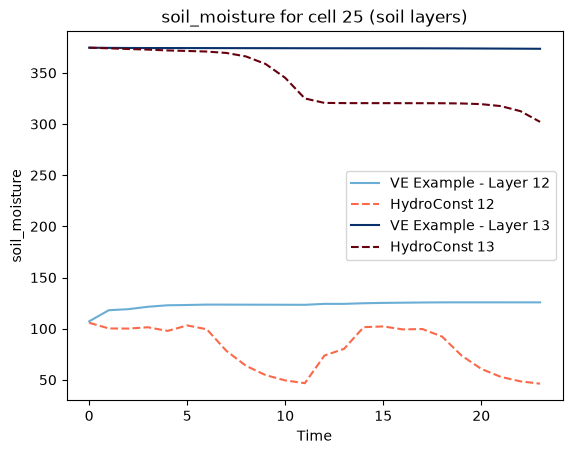
The next figure shows the evolution of soil moisture over time. Interestingly, the
results appear identical for both the ve_example and HydroDefault scenarios. This
suggests that, under the conditions tested, soil moisture dynamics may be relatively
insensitive to fluctuations in abiotic conditions — or that other model components
dominate the response. However, understanding why this occurs would require a deeper
investigation into the model’s energy and water balance under both configurations.
4: HydroDry experiment#
Configure lower initial soil moisture#
To set up a hydrology-only experiment with a change in initial soil moisture, follow these steps:
This is essential: Create a new output folder for your experiment, for example
/ve_example/HydroDry_out/.Navigate to the
/ve_example/out/folder.Copy the
compiled_configuration.toml.tomlfile and rename toHydroDry_config.toml. We moved this file to a separate folder/ve_example/static_config/.Check the status flags are set to
static = true, for all but the hydrology model.Make further changes to your configuration for your experiment. Here, we modify the initial soil moisture from the default value of 0.5 to 0.3 (line 2 below):
  [hydrology]
  initial_soil_moisture = 0.3
  initial_groundwater_saturation = 0.9
  static = false
Run HydroDry experiment#
Now run the model with the new configuration from your command line. Again, make sure
that the --outpath command in the second line is followed by the directory of the new
output folder that you just created (here /tmp/ve_example/HydroDry_out/),
and the --logfile command in the third line is followed by the same path and a new
file name ending in .log:
%%script bash --err discarded_stderr
ve_run /tmp/ve_example/static_config/HydroDry_config.toml \
  --outpath /tmp/ve_example/HydroDry_out/ \
  --logfile /tmp/ve_example/HydroDry_out/HydroDry.log
Compare HydroConst and HydroDry results#
To compare the results of different initial soil moisture levels in the hydrology-only
configuration, load the continuous results from /ve_example/HydroDry_out/:
hydrodry = xarray.load_dataset(
    "/tmp/ve_example/HydroDry_out/model_data.zarr", group="outputs"
)
Soil moisture initial conditions#
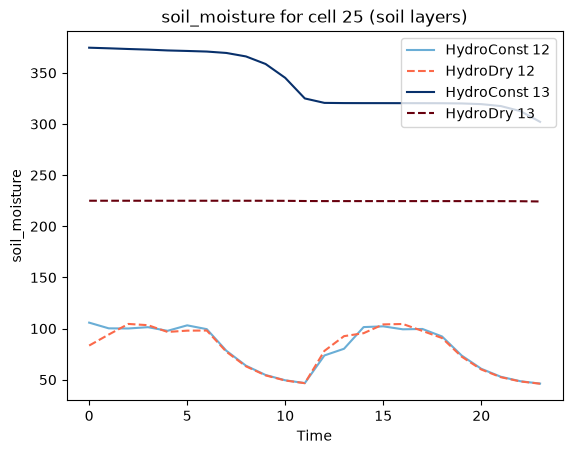
Now plot the soil moisture over time for both experiments. You will see that while the lower soil layer reaches a similar level in both runs after a few time steps, the top soil layer stabilizes at a different level. This suggests that initial conditions may influence the longer-term behaviour of some variables, even in a simplified setup.
One possible explanation is that the upper soil layer responds more directly to atmospheric conditions and surface fluxes, and may therefore retain some memory of its initial state. In contrast, the deeper soil layer could be less sensitive to short-term changes and more likely to converge across scenarios. However, this behaviour requires further investigation to understand the underlying dynamics, especially in the context of a static configuration.