

The core.grid module#
This module is used to define the grid of cells used in a virtual_ecosystem
simulation. Square and hexagon grids are currently supported.
import matplotlib.pyplot as plt
import numpy as np

from virtual_ecosystem.core.grid import Grid
Square grids#
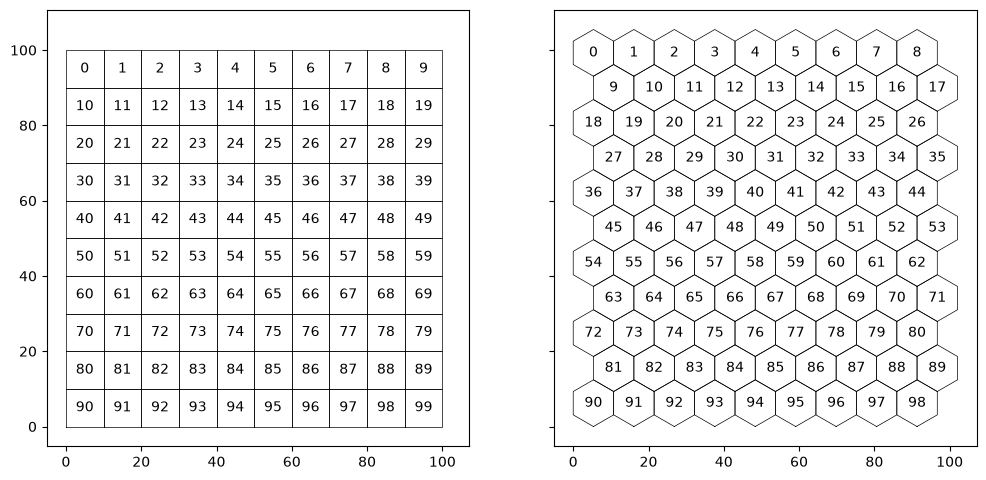
A square grid is defined using the cell area, and the number of cells in the X and Y directions to include in the simulation.
square_grid = Grid(grid_type="square", cell_area=100, cell_nx=10, cell_ny=10)
square_grid
CoreGrid(square, A=100, nx=10, ny=10, n=100, bounds=(0.0, 0.0, 100.0, 100.0))
Hexagon grids#
A hexagon grid is defined in a very similar way - alternate rows of hexagons are offset to correctly tessellate the individual cells.
hex_grid = Grid(grid_type="hexagon", cell_area=100, cell_nx=9, cell_ny=11)
hex_grid
CoreGrid(hexagon, A=100, nx=9, ny=11, n=99, bounds=(0.0, 0.0, 102.08414352323646, 105.46855069823796))
Cell ID codes#
Cells are identified by unique sequential integer ID values, which are stored in the
Grid.cell_id attribute. These ID values provide an index to other cell attributes
stored within a Grid instance:
Grid.polygon[cell_id]: This retrieves aPolygonobject for the cell boundaries.Grid.centroid[cell_id]: This retrieves a numpy array giving the coordinates of cell centroids.
These Grid attributes are used in the code below to show the default cell ID numbering
scheme.
Grid centroids#
The centroids of the grid cell polygons are available via the centroids attribute as a
numpy array of (\(x\), \(y\)) pairs: these can be indexed by cell id:
square_grid.centroids[0:5]
array([[ 5., 95.],
       [15., 95.],
       [25., 95.],
       [35., 95.],
       [45., 95.]])
Grid origin#
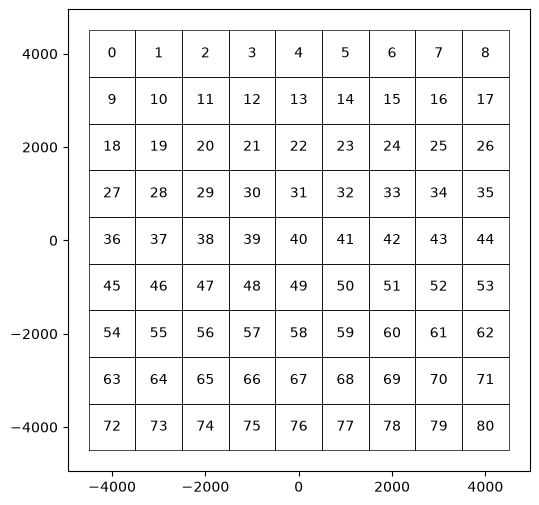
Grid types can take optional offset arguments (offx and offy) to set the origin of
the grid. This can be useful for aligning a simulation grid with data in real projected
coordinate systems, rather than having to move the origin in multiple existing data
files.
offset_grid = Grid(
    grid_type="square", cell_area=1000000, cell_nx=9, cell_ny=9, xoff=-4500, yoff=-4500
)

offset_grid
CoreGrid(square, A=1000000, nx=9, ny=9, n=81, bounds=(-4500.0, -4500.0, 4500.0, 4500.0))
Neighbours#
The set_neighbours method can be used to populate the neighbours attribute. This
contains a list of the same length as cell_id, containing arrays of the cell ids of
neighbouring cells. At present, only a distance-based neighbourhood calculation is used.
The neighbours of a specific cell can then be retrieved using its cell id as an index.
square_grid.set_neighbours(distance=10)
square_grid.neighbours[45]
array([35, 44, 45, 46, 55])
hex_grid.set_neighbours(distance=15)
hex_grid.neighbours[40]
array([30, 31, 39, 40, 41, 48, 49])
Distances#
The get_distance method can be used to calculate pairwise distances between lists of
cell ids. A single cell id can also be used.
square_grid.get_distances(45, square_grid.neighbours[45])
array([[10., 10., 0., 10., 10.]])
hex_grid.get_distances([1, 40], hex_grid.neighbours[40])
array([[38.74416988, 46.83941741, 42.98279727, 49.24298052, 56.86089612,
        53.72849659, 59.82952172],
       [10.74569932, 10.74569932, 10.74569932,  0.        , 10.74569932,
        10.74569932, 10.74569932]])
By default, cell-to-cell distances are calculated on demand, because the size of the
complete pairwise distance matrix scales as the square of the grid size. However, the
populate_distances method can be used to populate that matrix, and it is then used by
get_distance for faster lookup of distances.
square_grid.populate_distances()
square_grid.get_distances(45, square_grid.neighbours[45])
array([[10., 10., 0., 10., 10.]])
Mapping points to grid cells#
The Grid class also provides methods to map coordinates onto grid cells.
Mapping coordinates#
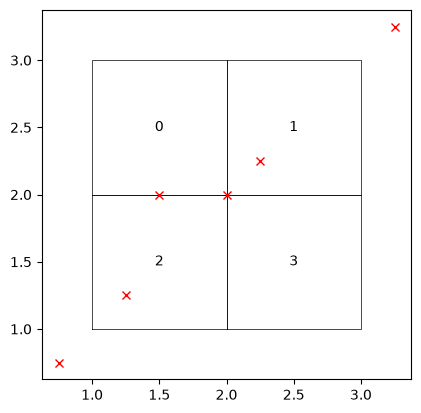
The map_xy_to_cell_id method is more general and simply returns the cell ids (if any)
of the grid cells that intersect pairs of coordinates. Note that points that lie on
cell boundaries will intersect all of the cells sharing a boundary.
The method returns a list of lists, giving the cell_ids for each pair of points in turn.
# A simple small grid
simple = Grid("square", cell_nx=2, cell_ny=2, cell_area=1, xoff=1, yoff=1)

# Points that lie outside, within and on cell boundaries
points_x = np.array([0.75, 1.25, 1.5, 2, 2.25, 3.25])
points_y = np.array([0.75, 1.25, 2, 2, 2.25, 3.25])
# Recover the cells under each pair of points.
simple.map_xy_to_cell_id(points_x, points_y)
[[], [2], [2, 0], [2, 3, 0, 1], [1], []]
Mapping point coverage of grid#
The map_xy_to_cell_indexing method takes a set of X and Y coordinates and checks
that the points provide a one-to-one mapping to the grid cells.
The function will raise ValueError exceptions if:
any points ambiguously lie on cell boundaries,
if more than one point falls in any cell,
if no points fall in a cell, or
any points fall outside all the grid cells.
It then returns indices from the original X and Y axes that map the 2 dimensional data onto a one dimensional cell id axis in the correct order. This is primarily used in loading and validating a dataset and then coercing it into the standard internal representation.
# A small dataset with coordinates that covers the grid
data = np.array([[23, 33], [22, 32]])
cx = np.array([2.5, 1.5])
cy = np.array([1.5, 2.5])
idx_y, idx_x = np.indices(data.shape)

# Get the coordinates and indices along those coordinates as 1 dimensional arrays
idx_xf = idx_x.flatten()
idx_yf = idx_y.flatten()
points_x = cx[idx_xf]
points_y = cy[idx_yf]

# Validate and recover the mapping
dx, dy = simple.map_xy_to_cell_indexing(points_x, points_y, idx_xf, idx_yf)
print(dx, dy)
[1 0 1 0] [1 1 0 0]
data[dx, dy]
array([32, 33, 22, 23])
# A set of points that extend beyond the grid
data = np.array(
    [[14, 24, 34, 44], [13, 23, 33, 43], [12, 22, 32, 42], [11, 21, 31, 41]]
)
cx = np.array([3.5, 2.5, 1.5, 0.5])
cy = np.array([0.5, 1.5, 2.5, 3.5])
idx_x, idx_y = np.indices(data.shape)

# Get the coordinates and indices along those coordinates as 1 dimensional arrays
idx_xf = idx_x.flatten()
idx_yf = idx_y.flatten()
points_x = cx[idx_xf]
points_y = cy[idx_yf]
# Fails because points extend outside the grid
simple.map_xy_to_cell_indexing(points_x, points_y, idx_xf, idx_yf)
---------------------------------------------------------------------------
ValueError                                Traceback (most recent call last)
Cell In[19], line 2
      1 # Fails because points extend outside the grid
----> 2 simple.map_xy_to_cell_indexing(points_x, points_y, idx_xf, idx_yf)

File ~/checkouts/readthedocs.org/user_builds/virtual-ecosystem/checkouts/latest/virtual_ecosystem/core/grid.py:579, in Grid.map_xy_to_cell_indexing(self, x_coords, y_coords, x_idx, y_idx)
    577 # Raise an exception where not all coords fall in a grid cell
    578 if 0 in cell_counts:
--> 579     raise ValueError("Mapped points fall outside grid.")
    581 # Values greater than 1 indicate coordinates on cell edges
    582 if any([c > 1 for c in cell_counts]):

ValueError: Mapped points fall outside grid.
Export grid to GeoJSON#
A created grid can also be exported as GeoJSON using the dumps and dump methods:
simple = Grid("square", cell_nx=2, cell_ny=2, cell_area=1)

simple.dumps()
'{"type": "FeatureCollection", "features": [{"type": "Feature", "geometry": {"type": "Polygon", "coordinates": [[[0.0, 1.0], [1.0, 1.0], [1.0, 2.0], [0.0, 2.0], [0.0, 1.0]]]}, "properties": {"cell_id": 0, "cell_cx": 0.5, "cell_cy": 1.5}}, {"type": "Feature", "geometry": {"type": "Polygon", "coordinates": [[[1.0, 1.0], [2.0, 1.0], [2.0, 2.0], [1.0, 2.0], [1.0, 1.0]]]}, "properties": {"cell_id": 1, "cell_cx": 1.5, "cell_cy": 1.5}}, {"type": "Feature", "geometry": {"type": "Polygon", "coordinates": [[[0.0, 0.0], [1.0, 0.0], [1.0, 1.0], [0.0, 1.0], [0.0, 0.0]]]}, "properties": {"cell_id": 2, "cell_cx": 0.5, "cell_cy": 0.5}}, {"type": "Feature", "geometry": {"type": "Polygon", "coordinates": [[[1.0, 0.0], [2.0, 0.0], [2.0, 1.0], [1.0, 1.0], [1.0, 0.0]]]}, "properties": {"cell_id": 3, "cell_cx": 1.5, "cell_cy": 0.5}}]}'