

Adding and using data with the Virtual Ecosystem#
A Virtual Ecosystem simulation requires data to run. That includes the loading of
initial forcing data for the model - things like air temperature, elevation and
photosynthetically active radiation - but also includes the storage of internal
variables calculated by the various models running within the simulation. The data
handling for simulations is managed by the Data
class, which provides the data loading and storage functions for the Virtual Ecosystem.
The data system is extendable to provide support for different file formats and axis
validation (see the module API docs) but that is beyond the
scope of this document.
A Virtual Ecosystem simulation will have one instance of the
Data class to provide access to the different
forcing and internal variables used in the simulation. As they are loaded, all variables
are validated and then added to an xarray.Dataset object, which provides a
consistent indexing and data manipulation for the underlying arrays of data.
In many cases, a user will simply provide a configuration file to set up the data that will be validated and loaded when a simulation runs, but the main functionality for working with data using Python are shown below.
Validation#
One of the main functions of the data module is to
automatically validate data before it is added to the Data instance. Validation is
applied along a set of core axes used in the simulation. For a given core axis:
The dimension names of a dataset are used to identify if data should be validated on that axis. For example, a dataset with
xandydimensions will be validated on thespatialcore axis.The axis will have a set of defined validators, which are provided to handle different possible data configurations. For example, there is a specific
spatialvalidator used to handle a dataset withxandydimensions but no coordinate values.When a dataset is checked against a core axis, the validation checks to see that one of those validators applies to the actual configuration of the data, and then runs the specific validation for that configuration.
The validation process is primarily intended to check that the sizes or coordinates of the dimensions of provided datasets are congruent with the configuration of a particular simulation. Validators may also standardise or subset input datasets to map them onto a particular axis configuration.
For more details on the different core axes and the alternative mappings applied by validators see the core axis documentation.
Creating a Data instance#
A Data instance is created using information
that provides information on the core configuration of the simulation. At present, this
is just the spatial grid being used.
from pathlib import Path

import numpy as np
from xarray import DataArray


from virtual_ecosystem.core.config_builder import (
    ConfigurationLoader,
    generate_configuration,
)
from virtual_ecosystem.core.grid import Grid
from virtual_ecosystem.core.data import Data
from virtual_ecosystem.core.axes import *
from virtual_ecosystem.core.readers import load_to_dataarray

# Create a grid with square 100m2 cells in a 10 by 10 lattice and a Data instance
grid = Grid(grid_type="square", cell_area=100, cell_nx=10, cell_ny=10)
data = Data(grid=grid)

data
Data: no variables loaded
Adding data to a Data instance#
Data can be added to a Data instance using one of
two methods:
An existing DataArray object can be added to a
Datainstance just using the standard dictionary assignment:data['var_name'] = data_array. The Virtual Ecosystemreadersmodule provides the functionload_to_dataarray()to read a list of variables in a file into DataArrays from supported file formats. The returned value is a dictionary of DataArrays keyed by the variable names and can then be added directly to a Data instance:loaded_data = load_to_dataarray("path/to/file.nc", var_names=["temperature"]) # iterate over the dictionary of variable names and arrays for var_name, data_array in loaded_data.items(): data[var_name] = data_array
The
load_data_config()method takes a loaded Data configuration - which is a set of named variables and source files - and then just usesload_to_dataarray()to try and load each one.
Adding a data array directly#
Adding a DataArray to a Data method takes an
existing DataArray object and then uses the built in validation to match the data onto
core axes. So, for example, the grid used above has a spatial resolution and size:
grid
CoreGrid(square, A=100, nx=10, ny=10, n=100, bounds=(0.0, 0.0, 100.0, 100.0))
One of the validation routines for the core spatial axis takes a DataArray with x and
y coordinates and checks that the data covers all the cells in a square grid:
temperature_data = DataArray(
    np.random.normal(loc=20.0, size=(10, 10)),
    name="air_temperature",
    coords={"y": np.arange(5, 100, 10), "x": np.arange(5, 100, 10)},
)

temperature_data.plot()
<matplotlib.collections.QuadMesh at 0x7db1fedb96a0>
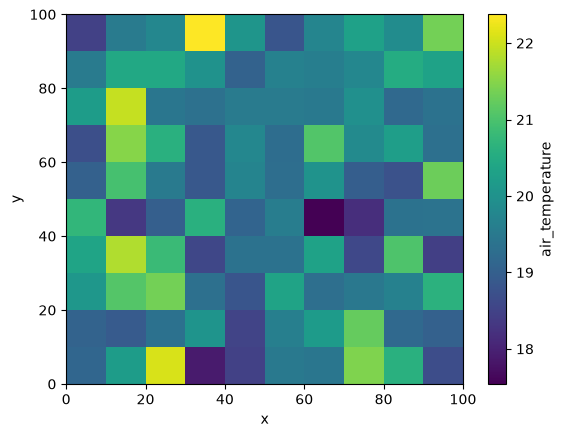
That data array can then be added to the loaded and validated:
data["air_temperature"] = temperature_data
[INFO] - data - __setitem__(235) - Adding data array for 'air_temperature'
The representation of the virtual_ecosystem.core.data.Data instance now shows
the loaded variables:
data
Data: ['air_temperature']
A variable can be accessed from the data object using the variable name as a key, and
the data is returned as a :class:xarray.DataArray object.
Note that the x and y coordinates have been mapped onto the internal cell_id
dimension used to label the different grid cells (see the Grid
documentation for details).
# Get the temperature data
loaded_temp = data["air_temperature"]

print(loaded_temp)
<xarray.DataArray 'air_temperature' (cell_id: 100)> Size: 800B
array([18.46740579, 19.53540295, 19.78394699, 22.37605654, 20.05666332,
       18.81777015, 19.74802872, 20.29070486, 19.87986701, 21.35193814,
       19.54229007, 20.43238549, 20.43587239, 19.98903   , 19.05158936,
       19.64403685, 19.59956416, 19.78754734, 20.50636428, 20.32101754,
       20.19229371, 21.9459161 , 19.44680327, 19.3180806 , 19.54166005,
       19.53710372, 19.4881266 , 19.94644033, 19.17898136, 19.3547424 ,
       18.70491638, 21.50040828, 20.61016614, 18.86286651, 19.77720515,
       19.24596371, 21.06251602, 19.84021739, 20.24125047, 19.3118636 ,
       19.02849267, 20.95856701, 19.51628075, 18.8517313 , 19.72114926,
       19.26356535, 20.0157765 , 18.96059634, 18.7516872 , 21.29755762,
       20.72534634, 18.31906723, 18.97718921, 20.60487495, 19.08894007,
       19.57962368, 17.54082527, 18.17012659, 19.36646836, 19.39077781,
       20.36680242, 21.80196078, 20.81114125, 18.56750274, 19.36062276,
       19.36183861, 20.32400296, 18.58718485, 21.02835067, 18.43699777,
       20.10953221, 21.07862277, 21.34783906, 19.29779564, 18.81758495,
       20.33671826, 19.2952921 , 19.47698183, 19.65005228, 20.62489262,
       19.05187937, 18.91235988, 19.34303283, 20.04981915, 18.50551265,
       19.61637287, 20.17781446, 21.23016589, 19.17353275, 19.02967344,
       19.12067422, 20.19313254, 22.09162388, 17.89095468, 18.48107474,
       19.4886836 , 19.44177099, 21.43970965, 20.60942973, 18.66046709])
Coordinates:
    y        (cell_id) int64 800B 95 95 95 95 95 95 95 95 95 ... 5 5 5 5 5 5 5 5
    x        (cell_id) int64 800B 5 15 25 35 45 55 65 ... 35 45 55 65 75 85 95
Dimensions without coordinates: cell_id
Attributes:
    unit:         C
    description:  Air temperature profile
You can check whether a particular variable has been validated on a given core axis
using the on_core_axis() method:
data.on_core_axis("air_temperature", "spatial")
True
Loading data from a file#
Data can be loaded directly from a file by providing a path to a supported file
format and the name of a variable stored in the file. In this example below, the
NetCDF file contains a variable temp with dimensions x and y, both of which
are of length 10: it contains a 10 by 10 grid that maps onto the shape of the
configured grid.
# Load data from a file
file_path = Path("../../data/xy_dim.nc")
loaded_data = load_to_dataarray(file_path, var_names=["air_temperature"])

# iterate over the dictionary of variable names and arrays
for var_name, data_array in loaded_data.items():
    data[var_name] = data_array
[INFO] - readers - load_to_dataarray(266) - Loading variables from file ../../data/xy_dim.nc: air_temperature
[INFO] - data - __setitem__(237) - Replacing data array for 'air_temperature'
data
Data: ['air_temperature']
data.on_core_axis("air_temperature", "spatial")
True
Loading data from a configuration#
The configuration files for a Virtual Ecosystem simulation can include a data configuration section. This can be used to automatically load multiple datasets into a Data object. The configuration file is TOML formatted and should contain an entry like the example below for each variable to be loaded.
[[core.data.variable]]
file_path = "'../../data/xy_dim.nc'"
var_name = "temp"
You can include core.data.variable tags in different files. This can be useful to
group model-specific data with other model configuration options, and allow
configuration files to be swapped in a more modular fashion.
To load configuration data , you will typically use the cfg_paths argument to pass one
or more TOML formatted configuration files to create a object. You can also use a string
containing TOML formatted text or a list of TOML strings to create a configuration
object:
data_toml = """[[core.data.variable]]
file_path = "../../data/xy_dim.nc"
var_name = "air_temperature"
"""

config_data = ConfigurationLoader(cfg_strings=data_toml)
config = generate_configuration(config_data.data)
[INFO] - config_builder - _load_config_toml_string(478) - Config TOML loaded from config strings
[INFO] - config_builder - _compile_data(374) - Configuration data compiled.
[INFO] - registry - _register_module(163) - Registering module: virtual_ecosystem.core
[INFO] - registry - _register_module(176) - Configuration class registered for virtual_ecosystem.core
[INFO] - config_builder - generate_configuration(629) - Configuration model built.
[INFO] - config_builder - generate_configuration(642) - Configuration validated.
The Config object can then be passed to the load_data_config method:
data.load_data_config(config.core)
[INFO] - data - load_data_config(327) - Loading data from configuration
[INFO] - readers - load_to_dataarray(266) - Loading variables from file ../../data/xy_dim.nc: air_temperature
[INFO] - data - __setitem__(237) - Replacing data array for 'air_temperature'
data
Data: ['air_temperature']
Data output#
The entire contents of the Data object can be output using the
save_to_zarr() method:
data.save_to_zarr(output_file_path=output_file_path)
You can reduce the size of the output data by only saving specific variables:
variables_to_save = ["variable_a", "variable_b"]
data.save_to_zarr(
    output_file_path=output_file_path,
    variables_to_save=variables_to_save
)
In practise, when a simulation is running, the science models only write the current
value of variables to the Data object. The main model code uses the
save_current_state_to_zarr() method to build up
a complete data store by appending variables at each time step.